Messages, photos and AI
Worksheets, teacher notes, fact-check answers and a class agreement sheet.
Download PDFFree worksheets, activities and teacher notes about messages, sharing photos, sources and AI. Choose your school stage and download materials for your next lesson.
Choose an audience to find activities, teacher notes and follow-up ideas. All examples are fictional, and the activities work on paper.
Two classroom activities. Adjust the time to suit your group.
Practise asking permission and accepting a no.
You need: The worksheet, paper and colouring pencils. An adult reads the story aloud.
A fictional story: Asta and Noa have built a tower. Asta takes a picture of the tower and Noa. Asta asks: "May I send the picture to our group?" Noa replies: "No, I do not want to be in the picture. You can show the tower."
Follow up: Agree on a sentence the class can use when someone does not want to be photographed.
Choose what to keep private and who can help.
You need: The worksheet and pencils. Read the messages aloud or act them out with paper characters.
Fictional game messages: Star7 writes to a character called Mio: "You are good! What is your school's name? Send me a picture of you and I will give you a gift. You do not need to tell the adults." Mio only knows Star7 from the game.
Follow up: Practise saying: "I have received a message I need help with."
All five groups. Your activities start on page 1.
Two classroom activities. Adjust the time to suit your group.
Look at how a message excludes someone and write a different reply.
You need: The worksheet chat and paper for a new reply. Work in groups of three.
A fictional class chat: Ella: "Shall we play after school?" Malte: "Yes, but not with Sam. Make a new group without him." Sam: "I can play at four." A third pupil reads the messages without replying.
Follow up: Write one agreement about how the class responds when someone is excluded.
Compare an answer with a source before using the information.
You need: The worksheet fact card, prepared AI example and two colours. No AI account is needed.
Fictional fact card from the teacher: "Class trip on Tuesday. We leave school at 9 am. We visit the library. Bring a packed lunch. We return at 12.30 pm." Prepared AI example: "Meet at the station on Tuesday at 9.30 am. The library provides lunch. The trip costs 59 kroner."
Follow up: Use the question "Where does it say that?" the next time the class checks an answer.
All five groups. Your activities start on page 3.
Two classroom activities. Adjust the time to suit your group.
Choose actions that support the person in the picture.
You need: The fictional worksheet scenario and paper. Use no real photographs or student cases.
A fictional situation: A picture of Alex asleep on the bus after a class trip is shared with a mocking caption. Alex writes: "Remove it. I do not want it shared." A pupil replies: "It is just a joke." Several people in the group have seen the message.
Follow up: Agree how the class will help a pupil who wants a picture removed.
Separate observations, assumptions and things that need checking.
You need: The worksheet profile card. Make three columns: know, assume and need to check.
Fictional profile card: PlayerNova has 18 followers and a bio saying "15, love gaming". The same alias and avatar appear on another platform. A message says: "I think we go to the same school. I can give you game credits. Send the one-time code on your phone and I will sort it out."
Follow up: Make a short list of things a profile match can never prove.
All five groups. Your activities start on page 5.
Two classroom activities. Adjust the time to suit your group.
Assess whether a conclusion goes beyond its evidence.
You need: The worksheet source card and prepared AI paragraph. Work in pairs with highlighters.
Fictional source card: A school asks 24 volunteer pupils about one week of phone-free breaks. Fifteen say they talked more. There is no earlier measurement or comparison group. Prepared AI paragraph: "Research proves that phone-free breaks improve every young person's wellbeing. The school's study shows a lasting effect."
Follow up: Choose one claim in a later assignment and state exactly what its source supports.
Explain your choices and AI use within a specific assignment brief.
You need: The fictional assignment brief and work log on the worksheet. No account or real assignment is needed.
Fictional assignment brief: "AI may be used for ideas. The analysis must be your own. Describe your use." Work log: "I asked AI for three angles. I chose the second. I also copied its analysis and changed a few words. I have not yet read the source AI mentions."
Follow up: Add a short note to the next assignment: "I used AI for ... I checked ..."
All five groups. Your activities start on page 7.
Two classroom activities. Adjust the time to suit your group.
Practise a first response that gives the child space to explain.
You need: The worksheet scenario and paper. Work in pairs as the adult and an observer.
A fictional situation: A child says: "Someone from the game keeps saying I owe him pictures. I replied before. Please do not take my phone away." The adult does not yet know what happened. The child has chosen to ask for help.
Follow up: Agree how a child can contact an adult, including after an incident at home or in the evening.
Rewrite a vague rule so everyone knows what to do and who follows up.
You need: The worksheet and paper. Work as a fictional parent or staff group.
A fictional class agreement says: "We use phones sensibly and are kind online." A homework message arrives at 10.30 pm. One pupil feels they must reply immediately. Another says their phone was put away, so they missed the task.
Follow up: At the follow-up, ask: "Which agreement helped, and what was still unclear?" Change one thing at a time.
All five groups. Your activities start on page 9.
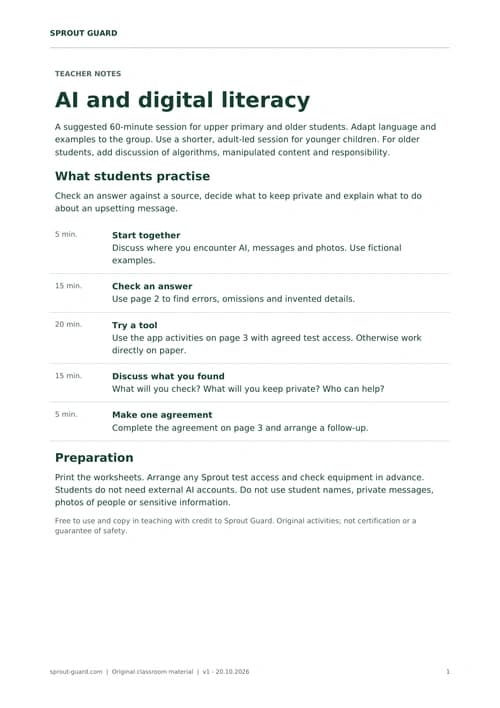
The materials work on paper, without AI accounts or access to the apps. Use the sheets before, during or after a session, or choose an activity for your own lesson.
Worksheets, teacher notes, fact-check answers and a class agreement sheet.
Download PDF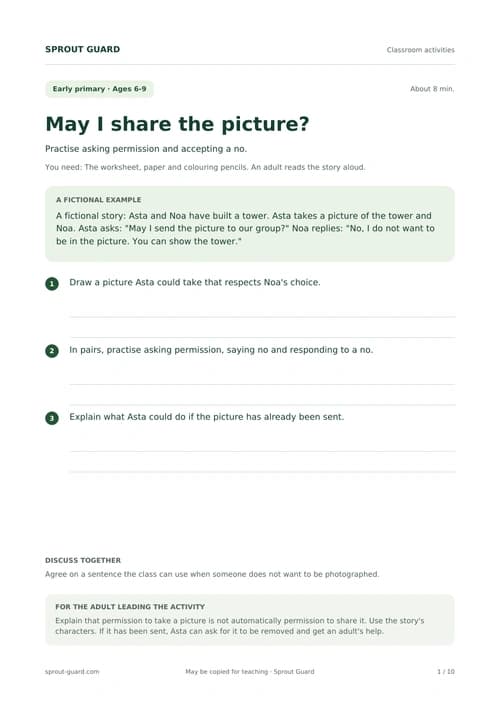
Try an activity
Compare two short texts about a class trip.
Both texts were written for this activity. The simulated AI answer is deliberately incorrect.
The class meets at school at 9.00. The trip is to the library. Everyone brings a packed lunch. The class returns at 12.30.
We meet at the station at 9.30 and go to the library. Lunch is provided and the ticket costs DKK 59.
Which details are wrong, missing or invented?
Ask students to write a new answer using only the fact card. Discuss how to use the same method with a real AI answer.
Prepare your lesson
Find AI programmes, conversation cards and practical answers.
We can show the apps on a shared screen or let small groups try them. We arrange this before the visit.
Check a fictional message and discuss how to rewrite it.
Cover a fictional name in a practice image and save an edited copy.
Examine a practice text and discuss why an analysis does not prove who created it.
The web apps are in development. We arrange access and check the equipment before the visit. If access is not ready, we use the worksheets and demonstrate the methods without apps.
Use fictional messages, practice texts and images without people or private details. Students do not need accounts with external AI services. The app’s analysis can be wrong and needs to be assessed by students and the adult.
View current app statusWe adapt sessions for primary and secondary schools, boarding schools, folk high schools and youth education. We also offer talks for parents and staff. Younger children work through short activities with an adult.
No. The sample session and worksheets work without an account with an external AI service. A teacher can show examples on a shared screen.
Yes. We can use the web apps in an agreed test session once access is ready. The apps are still in development. We arrange equipment and a guided try-out before the visit, using fictional information only.
Tell us about your audience, location and the visit you have in mind. You receive the price and practical details before deciding. Apps and materials are free; visits may have a cost.
Sprout’s activities are original materials. Find further information about digital literacy and children’s use of AI at:
We agree the content, duration and price with you.
Choose your audience and topic. We agree the content, duration, price and practical arrangements with you.
