Tasks and answers stay on your device. Activities cannot determine whether everything online is safe.
What you can do
- Create a task for reading, maths or writing.
- Adapt the suggested steps to your child’s assignment.
- Work through one step at a time and save what your child learned.
- Practise online choices in missions about messages, privacy, links, photos and agreements.
Why this app?
When a task feels too big to start
Where do you begin when an assignment feels overwhelming? In Learning, your child can break it into smaller steps and work through them one at a time. They do their own writing and save what they have learned.
Choose reading, maths or writing and adapt the steps to the task. Short missions also explore online choices, such as what to do with an unfamiliar link or a request for private information.
The app supports your child’s work without doing the assignment for them. The missions offer practice; they cannot determine whether everything online is safe.
Get started
- Create a new task in the tasks view and give it a name.
- Choose reading, maths or writing, adjust the steps and save the task.
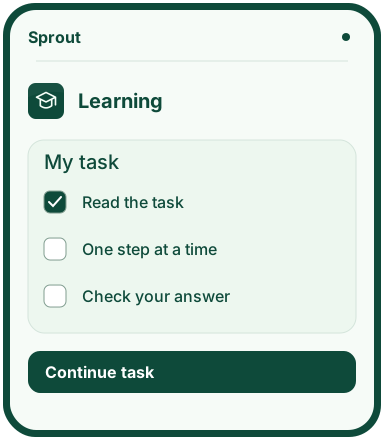
- Work on the step shown and mark it as finished once it is done.
- Write down what you learned or choose an exercise in the missions view.
Preview the app
More about the features
One step at a time
Children choose reading, maths or writing, add their own steps and mark off the ones they finish.
Practise choices online
Missions cover messages, privacy, links, photos and agreements. Progress is saved so your child can return later.
Notice what helped
Children can save what worked and what they want to try next time. Tasks and progress stay in this browser. There is no AI, student account or automatic sharing with school.